
📝 Blog Summary
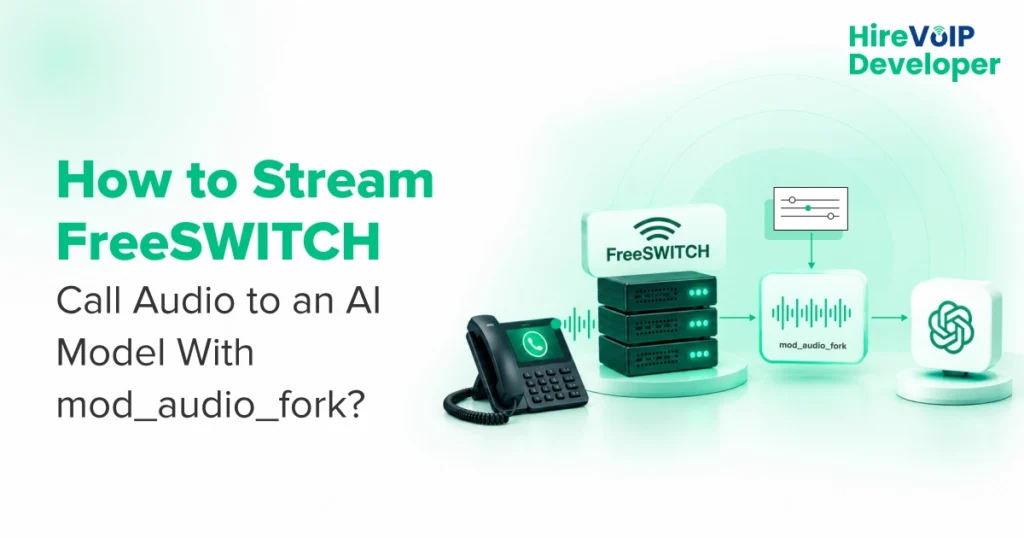
Connecting telephony channels to streaming speech models requires real-time media transport. With FreeSWITCH mod_audio_fork, developers attach a media bug to an active session, turning live audio into full-duplex WebSocket frames for transcription, LLMs, and speech synthesis.
This blog covers compiling the module on modern releases, setting up production dialplans, comparing it against mod_audio_stream, and preventing the latency bottlenecks that break conversational turn-taking.
To stream FreeSWITCH call audio to an AI model with FreeSWITCH mod_audio_fork, attach a media bug to the active channel session to capture raw Linear16 (L16) audio, stream those PCM frames in real time over WebSockets to an external speech-to-text pipeline, and return synthesized audio chunks over the same duplex socket for caller playback.
Building an interactive voice AI bot over standard telephony introduces architectural friction. Telephony networks operate in discrete 20ms G.711 or Opus packet intervals. Streaming AI models (such as whisper.cpp, faster-whisper, or Deepgram) expect clean, raw PCM streams delivered over persistent network sockets. Writing audio frames to local disk files (.wav) creates disk I/O bottlenecks and introduces hundreds of milliseconds of latency, making natural turn-taking impossible.
mod_audio_fork solves this problem by intercepting audio directly inside the FreeSWITCH core switch session, bypassing disk storage entirely.
What Is mod_audio_fork in FreeSWITCH, and How Does It Work?
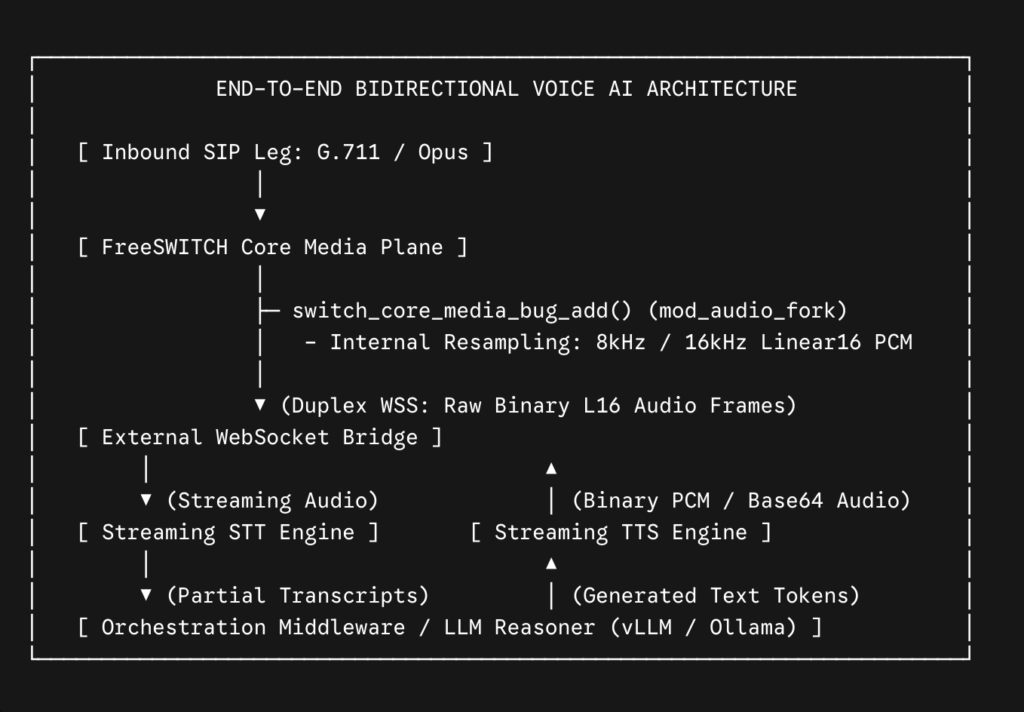
mod_audio_fork is an open-source FreeSWITCH endpoint application module that taps an active channel’s audio stream using the FreeSWITCH media_bug API. It streams uncompressed Linear16 (L16) audio frames over WebSockets (WS/WSS) to a remote server without storing temporary audio files on local disk.
Originally developed in the Drachtio ecosystem, the module runs in three operational phases:
- Attaching the Media Bug: The module hooks into the session via switch_core_media_bug_add(). It reads raw audio from either the caller leg (mono), both sides combined (mixed), or isolated tracks across separate stereo channels (stereo).
- Resampling and Packet Framing: FreeSWITCH automatically handles sample rate conversion. If the leg enters as 8kHz G.711 u-law, the media bug can upsample or downsample on the fly to deliver standard 8kHz or 16kHz 16-bit linear PCM.
- Full-Duplex Transport: Audio leaves FreeSWITCH as raw binary WebSocket messages. Simultaneously, the remote AI server can return audio packets back down the exact same WebSocket connection, instructing the module to play the audio directly into the caller’s ear.
mod_audio_fork vs mod_audio_stream: Which Should You Use?
While mod_audio_fork established the standard for WebSocket media tapping in FreeSWITCH, modern production voice AI stacks increasingly standardize on mod_audio_stream.
The original mod_audio_fork repository has seen limited updates over recent years, causing build breakages on contemporary Linux distributions and modern FreeSWITCH codebases. By contrast, mod_audio_stream is actively maintained, introduces native thread-safe connection pooling, supports granular WebSocket connection heartbeats, and compiles cleanly against current dependencies.
Use this mod_audio_fork vs. mod_audio_stream comparison matrix to select the right module for your environment:
AI Voicebot vs Transcription Service: Choosing the Right Audio Streaming Mode
To configure FreeSWITCH mod_audio_fork correctly, you need to match the audio mix type to your application goals: use bidirectional mono at 16kHz for interactive voice AI bots, and unidirectional stereo at 8kHz or 16kHz for passive post-call or real-time transcription.
- For Real-Time AI Voicebots: You only need the caller’s audio (mono) streamed to your Speech-to-Text (STT) model. Crucially, you must keep the duplex WebSocket open so your Text-to-Speech (TTS) synthesizer can return binary audio frames back into FreeSWITCH for caller playback. Never use mixed mode for a voicebot since it combines caller and bot audio into a single stream, causing the STT model to transcribe the bot’s own voice and triggering false interruptions (barge-in loops).
- For Real-Time Agent Assist & Compliance Transcription: You need dual-channel (stereo) audio. Channel 0 captures the caller, and Channel 1 captures the agent. Streaming isolated tracks allows speech recognition engines to transcribe both speakers simultaneously without crosstalk or channel bleed.
Also learn how to build an AI voice agent with FreeSWITCH and WebRTC.
How to Install and Compile FreeSWITCH mod_audio_fork on Modern FreeSWITCH Releases?
To install and compile mod_audio_fork on FreeSWITCH 1.10+, clone the repository, install development headers, point CMake to the decoupled FreeSWITCH libraries (libks and sofia-sip), compile the shared object, and load the module via fs_cli.
Most public tutorials fail because FreeSWITCH decoupled core libraries into external packages. If you run a standard make, the linker fails to locate header files.
Here is the build sequence for Debian 11/12:
# 1. Install prerequisites and development headers
sudo apt-get update && sudo apt-get install -y \
    build-essential cmake pkg-config libwebsockets-dev \
    libssl-dev zlib1g-dev mod_audio_fork

# 2. Clone the module repository
git clone https://github.com/mdslaney/mod_audio_fork.git
cd mod_audio_fork

# 3. Ensure PKG_CONFIG_PATH points to FreeSWITCH libraries
export PKG_CONFIG_PATH=/usr/lib/pkgconfig:/usr/local/FreeSWITCH/lib/pkgconfig

# 4. Configure and build via CMake
mkdir build && cd build
cmake -DCMAKE_BUILD_TYPE=Release ..
make -j$(nproc)

# 5. Copy the compiled shared object into the FreeSWITCH module directory
sudo cp mod_audio_fork.so /usr/lib/FreeSWITCH/mod/
# (or /usr/local/FreeSWITCH/mod/ depending on your installation prefix)
Once copied, tell FreeSWITCH to load the module at runtime via fs_cli:
fs_cli -x "load mod_audio_fork"
To persist the module across server reboots, add the load directive to your /etc/FreeSWITCH/autoload_configs/modules.conf.xml file:
<configuration name="modules.conf" description="Modules">
  <modules>
    <!-- Core and application modules -->
    <load module="mod_audio_fork"/>
  </modules>
</configuration>
FreeSWITCH Module Development Dialplan Configuration and API Syntax
To stream audio via the dialplan, answer the call, set subprotocol headers, execute the uuid_audio_fork start command with your target WebSocket URL, and park the channel to keep media flowing.
The command syntax requires five core arguments:
uuid_audio_fork start [metadata]
- <uuid>: The unique channel identifier generated by FreeSWITCH.
- <wss-url>: Your target WebSocket server address (ws:// or wss://).
- <mix-type>: Audio capture channel mode (mono for caller only, mixed for both legs summed, or stereo for isolated tracks).
- <sampling-rate>: Output sample rate (8k or 16k).
- [metadata]: An optional JSON-formatted string sent as the initial text frame immediately upon handshake.
Production XML dialplan example:
<include>
<context name="public">
<extension name="voice_ai_ingress">
<condition field="destination_number" expression="^5000$">
<action application="answer"/>
<!-- Optional subprotocol header required by some proxy servers -->
<action application="set" data="MOD_AUDIO_FORK_SUBPROTOCOL_NAME=audio.custom.org"/>
<!-- Start media bug: fork to WebSocket server in 16k mono -->
<action application="eval" data="${uuid_audio_fork(${uuid} start ws://10.0.0.50:8765
mono 16k {\"caller_id\":\"${caller_id_number}\",\"call_id\":\"${uuid}\"})}"/>
<!-- Keep session alive while AI model processes speech -->
<action application="park"/>
</condition>
</extension>
</context>
</include>
Sending Mid-Call Metadata and Handling Teardown
Telephony isn’t static. When a caller presses a DTMF key or an external database dip resolves, you can pass structured JSON strings mid-call over the existing socket without interrupting media transport:
fs_cli -x "uuid_audio_fork send_text {\"event\":\"dtmf\",\"digit\":\"1\"}"
When the conversation finishes, gracefully detach the media bug and close the socket:
fs_cli -x "uuid_audio_fork stop"
How to Connect FreeSWITCH mod_audio_fork to End-to-End Voice AI Pipeline? (FreeSWITCH to STT, LLM, and Audio Playback)
Connecting FreeSWITCH mod_audio_fork to an end-to-end voice AI pipeline requires an asynchronous WebSocket server that buffers 20ms Linear16 frames for streaming STT, passes resolved transcripts to an LLM, and streams synthesized TTS audio back down the WebSocket for playback to the caller.
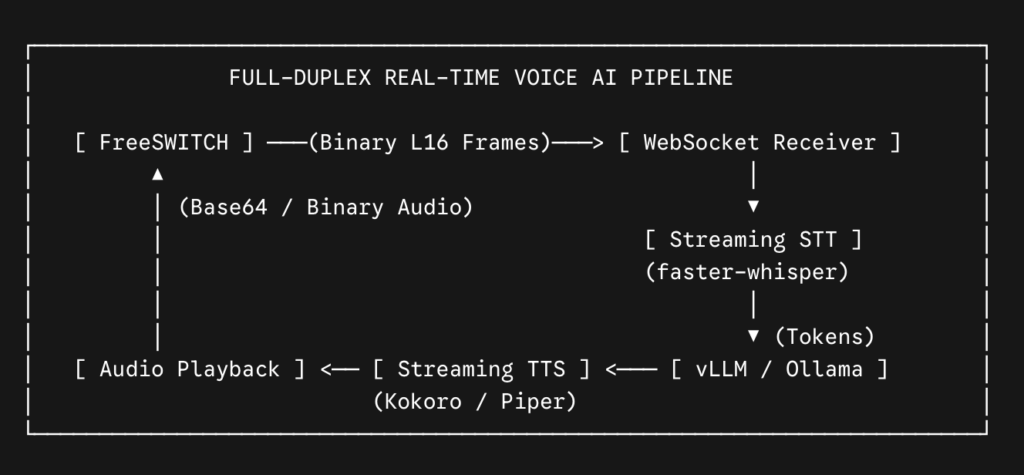
Here is a working asynchronous Python server using websockets that ingests audio, extracts session metadata, and demonstrates how to return synthesized audio back to the caller:
import asyncio
import json
import websockets

async def voice_ai_bridge(websocket):
    print("[WS] FreeSWITCH connected to audio socket.")
    session_data = None

    try:
        async for message in websocket:
            # 1. Handle incoming text frames (Initial metadata or mid-call DTMF)
            if isinstance(message, str):
                session_data = json.loads(message)
                print(f"[METADATA] Initialized session: {session_data}")

            # 2. Handle binary frames (Raw Linear16 PCM audio)
            elif isinstance(message, bytes):
                # 16kHz audio: 16,000 samples/sec * 2 bytes/sample *
0.02s = 640 bytes per 20ms chunk
                raw_pcm_chunk = message

                # Push raw_pcm_chunk to your streaming STT engine (e.g., faster-whisper)
                # user_text = await stt_service.transcribe(raw_pcm_chunk)

                # When your LLM generates a response and your TTS synthesizes audio,
                # send playback instructions back down this EXACT WebSocket:
                # response_payload = {
                #     "type": "playAudio",
                #     "audioContentType": "raw",
                #     "sampleRate": 16000,
                #     "audioContent": base64_audio_data
                # }
                # await websocket.send(json.dumps(response_payload))

    except websockets.exceptions.ConnectionClosed:
        print("[WS] FreeSWITCH session disconnected.")
    except Exception as e:
        print(f"[ERROR] Exception in audio bridge: {e}")

async def main():
    server = await websockets.serve(voice_ai_bridge, "0.0.0.0", 8765)
    print("Voice AI WebSocket Bridge running on port 8765...")
    await server.wait_closed()

if __name__ == "__main__":
    asyncio.run(main())
Production Latency and Concurrency Pitfalls (Tuning FreeSWITCH Media Bugs)
Moving from a local sandbox to 200 concurrent calls will expose specific low-level bottlenecks inside FreeSWITCH:
1. Speex Resampler CPU Overload
If incoming calls arrive over G.711 (8kHz) and your STT model requires 16kHz, FreeSWITCH runs software resampling on every active audio packet inside the media bug callback. Across hundreds of concurrent channels, this burns substantial CPU.
- How to Fix: Whenever possible, negotiate wideband codecs (like G.722 or Opus) with your carrier upstream, or benchmark whether your STT engine can ingest native 8kHz audio directly without upsampling.
2. Service Worker Thread Contention
By default, the module processes outbound WebSocket frames across a shared thread pool. Under high network traffic, socket latency can block the media bug loop.
- How to Fix: Tune this via environmental configuration before launching FreeSWITCH:
# Allocate between 1 and 5 dedicated network service threads
export MOD_AUDIO_FORK_SERVICE_THREADS=4
Allocating dedicated service threads ensures socket latency on one call does not stall audio frame processing on adjacent channels.
3. TCP Window Clamping and Buffer Overruns
If your Python or Node.js server blocks for even 50ms while evaluating an AI model, the TCP receive window clamps down. When TCP buffers fill up, FreeSWITCH’s media bug queue overflows, causing audio dropouts and audible stuttering.
- How to Fix: Decouple audio ingestion from inference. Let your WebSocket handler push raw audio packets immediately into an in-memory queue (like Redis or an asyncio.Queue), leaving your network thread free to ingest the next 20ms frame without delay.
💡 Expert Tip
Never force FreeSWITCH to handle core SIP transcoding on the same channel where you attach mod_audio_fork.
If a call requires converting incoming G.711 to Opus before forking L16 audio over WebSockets, the core switch thread will experience jitter under CPU spikes.
Terminate your carrier media as clean G.711 or native Opus at an edge Session Border Controller (SBC), and pass uniform, pre-transcoded audio to your FreeSWITCH media nodes.
Custom FreeSWITCH Module Development (When Stock Plugins Fall Short)
While stock tools like mod_audio_fork and mod_audio_stream work well for standard WebSocket routing, high-volume production platforms often hit limitations:
- Direct Shared-Memory Transport: Passing audio frames through local shared-memory (shm) circular buffers directly to GPU workers, bypassing the TCP/WebSocket stack entirely.
- In-Module Opus Decoding: Decoding Opus packets directly into linear PCM inside the media bug callback to eliminate core switch transcoding overhead.
- Mutual TLS (mTLS) Security: Enforcing hardware-backed cryptographic certificates between carrier media servers and internal inference clusters.
When your platform requires advanced FreeSWITCH module development, custom C/C++ media plane optimizations, or carrier-grade voice AI scaling, our senior VoIP engineering team is here to assist.
Whether you need to debug complex media bugs or architect low-latency voice cores, you can hire a dedicated FreeSWITCH engineer with deep telecom experience to build and harden your infrastructure.